
Remini vs Memory Murals: Which Restores Family Photos Better?
Remini and Memory Murals both restore old family photos — but they're built for different jobs. Head-to-head on five axes: free tier, face quality, black-and-white handling, original preservation, and what happens to the photo after the restoration finishes.
The Memory Murals Team • May 20, 2026
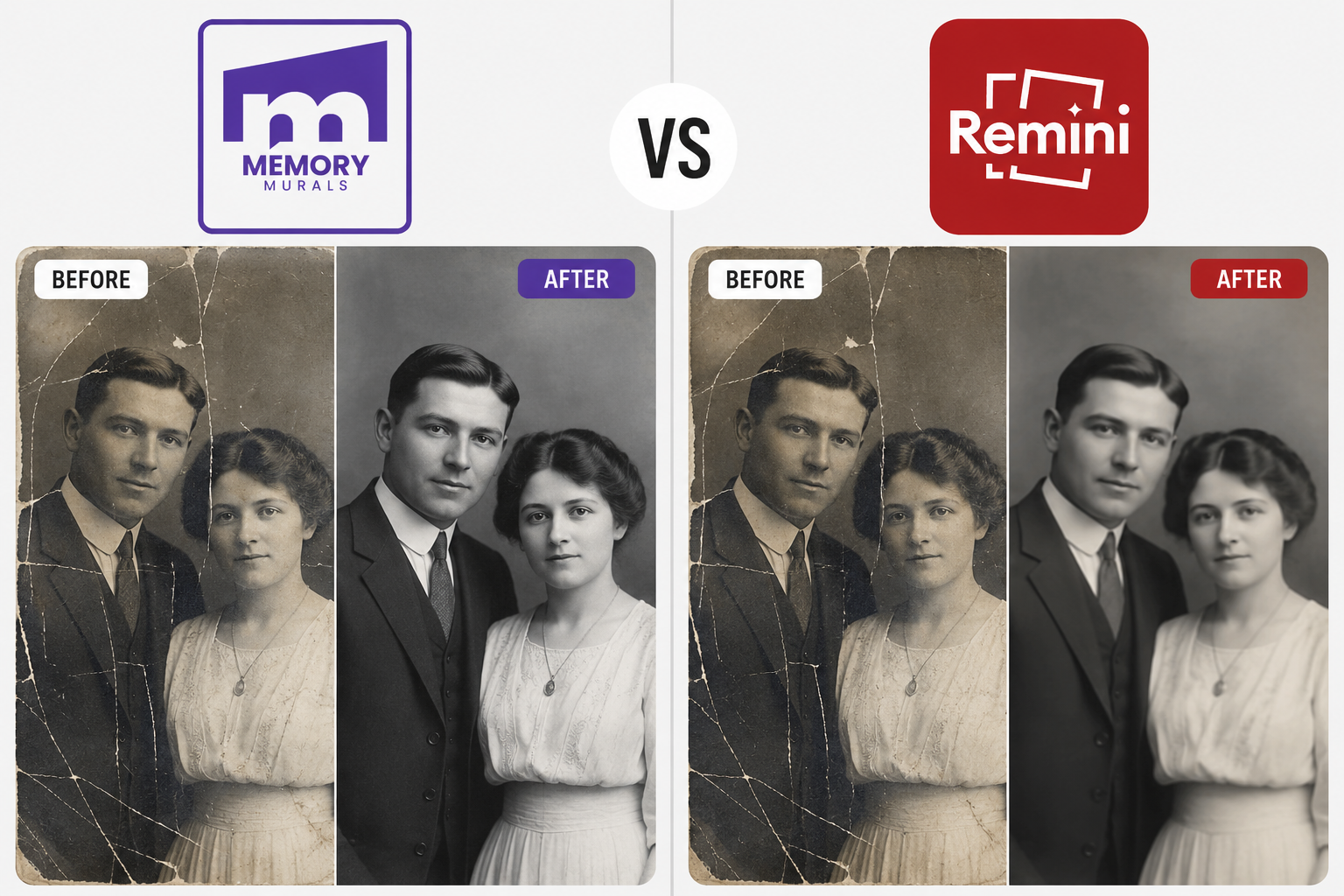
Remini is the consumer tool that taught a hundred million people what AI photo restoration looks like. If you've ever seen a TikTok where someone uploads a blurry childhood photo and the face suddenly snaps into clarity, that was almost certainly Remini. It's polished, mobile-first, genuinely impressive on faces, and free to try.
Memory Murals is the family archive that added restoration in 2026 — same technology category, different job. The photo doesn't get downloaded to your camera roll. It gets restored inside a private archive where the names, the year, the story, and the voice memo of who was there all live together.
If you're trying to pick between them, the right answer depends entirely on what you're trying to do with the photo six months from now. This is the honest head-to-head — five axes, no soft-pedaling, including the places Remini is genuinely better.
(For the wider competitive set, see our Best AI Photo Restoration Tools roundup.)
The shortcut if you only need one pick
Use Remini if you have one photo, want it restored fast, and are happy with a JPG download you'll save somewhere else. Use Memory Murals if you want the restored photo (and the original) kept somewhere your family can find it in twenty years, with the story of who's in it attached. Both can restore the same photo — the difference is what happens after.
Five-axis comparison
| Feature | Physical | Digital |
|---|---|---|
| Free tier | Free with ads on mobile. Daily caps, watermarks on some outputs, upgrade prompts mid-workflow. | Photo restoration is included with the 7-day Premium trial. After trial, restoration is part of the subscription. |
| Face restoration | Class-leading on faces — especially low-resolution selfies and faded portraits. Can occasionally hallucinate features on heavily damaged faces. | Strong on faces with a conservative prompt — preserves facial structure rather than inventing it. Less aggressive recovery on heavy damage, but more faithful to the original person. |
| Black-and-white handling | Mixed. Some Remini sub-tools may apply colorization unless you choose the correct module. Check the output before saving. | Instructed not to colorize. A 1940s B&W portrait comes back as a cleaner 1940s B&W portrait, not a tinted one. |
| Original preservation | Your original lives wherever you stored it — Remini doesn't manage that. The restored copy is a download. | The original scan is preserved automatically inside the archive, linked to the restored copy. You always have both. |
| What happens to the photo after | A JPG lands in your camera roll or Downloads folder. The next steps — where to back it up, who to share with, what to tag — are entirely on you. | Restored copy lands inside the family archive, tagged with the people in the photo, the year, the story, and any voice notes attached. Accessible to family members you've invited. |
Free tier
- PhysicalFree with ads on mobile. Daily caps, watermarks on some outputs, upgrade prompts mid-workflow.
- DigitalPhoto restoration is included with the 7-day Premium trial. After trial, restoration is part of the subscription.
Face restoration
- PhysicalClass-leading on faces — especially low-resolution selfies and faded portraits. Can occasionally hallucinate features on heavily damaged faces.
- DigitalStrong on faces with a conservative prompt — preserves facial structure rather than inventing it. Less aggressive recovery on heavy damage, but more faithful to the original person.
Black-and-white handling
- PhysicalMixed. Some Remini sub-tools may apply colorization unless you choose the correct module. Check the output before saving.
- DigitalInstructed not to colorize. A 1940s B&W portrait comes back as a cleaner 1940s B&W portrait, not a tinted one.
Original preservation
- PhysicalYour original lives wherever you stored it — Remini doesn't manage that. The restored copy is a download.
- DigitalThe original scan is preserved automatically inside the archive, linked to the restored copy. You always have both.
What happens to the photo after
- PhysicalA JPG lands in your camera roll or Downloads folder. The next steps — where to back it up, who to share with, what to tag — are entirely on you.
- DigitalRestored copy lands inside the family archive, tagged with the people in the photo, the year, the story, and any voice notes attached. Accessible to family members you've invited.
A quick clarification on pricing, because it's not directly comparable. Remini's pricing is in-app only — you'll see $9.99/week or an annual plan when you go to subscribe; the public site doesn't list either. Memory Murals' pricing is annual and includes the entire family archive (transcription, voice recording, family tree, calendar) on top of restoration — so the price-per-feature comparison isn't apples-to-apples. We try to be honest about that below.
Where the free tier matters and where it doesn't
Remini wins this axis on volume. The free tier is generous enough that millions of people genuinely never pay — they restore a single photo, save it, and move on. The catch is the ad load (you'll watch a 15–30 second video ad before each free restoration), the upgrade prompts, and occasional watermarks on certain output formats. For one-off use, none of that matters much.
Memory Murals doesn't have an ad-supported free tier for restoration. Restoration is included with the 7-day free Premium trial — you can restore as many photos as you want during the trial, no watermarks, no ads, no daily caps. After the trial, restoration is part of the annual subscription.
Remini wins for one-photo, no-commitment use
If you genuinely have one photo and don't care about the after-life of the restored copy, Remini's free tier does the job and you don't need anything else.
Memory Murals is the better trial-to-paid path
If you might restore more than three or four photos and you want the archive context anyway, the 7-day trial lets you do a real Saturday project with no friction.
On faces, Remini is genuinely better — with a caveat
This is the axis where Remini's hundred-million-user scale is most evident. The face model has been refined against more variation than almost any competitor's. On a faded portrait where eyes, mouth, or jawline have lost detail, Remini will recover a sharp, plausible face better than most tools.
Memory Murals' face restoration is conservative by design. The prompt instructs the model to preserve facial structure and avoid inventing features that aren't supported by the underlying image. The result: less dramatic improvement on heavily damaged faces, but a face that's still recognizably the actual person.
For grandparents in faded prints where the original face is mostly intact, the two tools are close to a tie. For severely damaged faces where Remini's confidence outruns the source data, the question isn't "which face looks better" — it's "which face is closer to the actual person." That's a judgment call.
The hallucination caveat
On photos where more than ~30% of the face data is missing — heavy water damage through the face, torn prints, mold — any AI restoration is partly inventing. Remini will give you a confident-looking face. Memory Murals will give you a less confident, more faithful result. Neither is "right" — they're optimized for different priorities. For historical photos where authenticity matters, the conservative output is the safer choice.
The colorization surprise nobody warned you about
This is a quieter axis than the others, but it matters if your collection has pre-1970s photos.
Some general-purpose photo restoration tools, including a few of Remini's enhancement modules, will apply color to a black-and-white photo unless you explicitly choose otherwise. Sometimes this is what you wanted. Often it isn't — the family member who handed you the photo wanted a cleaner version of the photo they remember, not a colorized reinterpretation. We've heard from users who restored a grandfather's 1942 military portrait and got back a flatly tinted version that looked nothing like the photo their family had treasured.
Memory Murals' restoration model is instructed to preserve monochrome — B&W in, B&W out. There's no toggle; it's the default behavior. If you specifically want colorization, you'd use a different tool — MyHeritage Colorize and Palette.fm are the standard picks.
Memory Murals: predictable B&W behavior
No surprises. Monochrome stays monochrome.
Remini: check the output, choose the right sub-tool
Remini's product is split into multiple modules (Old Photos Restorer, Face Enhancer, etc.). Some preserve B&W; some don't. Check the output before saving, and if you specifically want monochrome, pick the right sub-tool.
What happens to your scan
When you upload a photo to Remini, the app processes it and returns a restored version for you to download. The original scan you uploaded — assuming you scanned it yourself first — is still wherever you stored it (camera roll, Google Photos, a hard drive). Remini isn't responsible for managing the original; that's on you.
When you restore a photo inside Memory Murals, the original is preserved automatically. Internally, the restored copy is saved as a new file with a reference back to the original — they live together in the archive. You can compare them with a before/after slider, choose which one to display by default, or keep both visible. The original is never overwritten.
This matters more than people realize. For family photos with historical importance, archivists strongly recommend keeping the original alongside the restored version, because the original is the actual evidence and the restored version is partly inference. Memory Murals does this preservation step by default. On Remini, you have to remember to do it yourself, and most people don't.
The axis that decides which tool you actually want
If we had to pick the single most important axis on this comparison, this is it. Everything else is restoration quality. This is preservation quality.
When Remini finishes a restoration, what you have is a JPG. The JPG can go anywhere — your camera roll, Google Drive, a text message to your sister, a folder on your laptop. Where it ends up is your decision and your problem. Most people put it in three or four places, lose track of which one is canonical, and in two years they can't reliably find it again. By the time they want to show it to their daughter in 2046, the photo is "somewhere" and the story behind it is gone.
When Memory Murals finishes a restoration, the restored copy lands inside the family archive — already attached to the memory it belongs to, already tagged with the people in the photo (drawn from the family members you've already added), already accessible to the family members you've invited. Add a voice note about who's in the photo and the system transcribes it automatically. Twenty years from now, the photo is findable because it was organized the moment it was created, not because someone heroically organized it later.
This isn't a knock on Remini — they're building a restoration tool, not an archive. It's an acknowledgment that "restored JPG" is a partial deliverable. The full deliverable is the photo plus the context that makes it a memory. That's the gap.
The honest bottom line
For one photo, restored once, downloaded and managed yourself: Remini. For the family archive project — the porch photo, the wedding photo, the grandfather's military portrait, all with the names and stories attached, kept in one place that lasts: Memory Murals. Both can restore the same photo. The difference is whether the restored copy is the end of the project or the beginning of it. (Try the Memory Murals restoration on a 7-day free trial →)
Remini also does animation. So does MyHeritage.
A quick note for people who came to Remini for animation (the viral "make the photo move" feature) rather than restoration: Remini has an animation feature in addition to its restoration tools. It's good. It's also one of several options in this category — we cover the full landscape in our Deep Nostalgia alternatives roundup, since the standalone Deep Nostalgia tool MyHeritage launched in 2021 was discontinued and the replacement landscape is fragmented.
Memory Murals does not animate photos. We chose not to build that feature — for the same reason we restrained the restoration model: the kind of artifacts a 10-second animation introduces are not the kind of artifacts we want introduced into a family archive intended to last decades. The animation is a postcard. The archive is the postcard's house.
How to actually do this
If you've made your tool choice and you want to walk through the actual workflow — scan, restore, save — we wrote a step-by-step walkthrough that covers both the free path (Remini, Hotpot.ai) and the paid preservation path (Memory Murals). The mechanics are short.
Frequently asked questions
Is Remini better than Memory Murals for restoring old photos? For raw face restoration quality on heavily damaged photos, Remini is currently better — its face model has been refined against more data than most competitors. For preservation quality (keeping the original, attaching context, organizing for the long term), Memory Murals is built for it and Remini isn't. The right answer depends on whether you're optimizing for the cleanest restoration of one photo, or for an archive that lasts thirty years.
Does Remini watermark restored photos? On the free tier, some output formats and use cases will include a watermark or downscaling. Pro plans remove watermarks. Memory Murals does not watermark restored photos at any tier — restoration is included with the Premium trial and subscription without watermarks.
Is Memory Murals free? The full app, including photo restoration, is free to try for 7 days. After that, restoration is included with the annual subscription. There's no separate restoration-only plan — restoration is one feature of the broader family archive.
Does Remini keep the original photo, like Memory Murals does? No, not in the same way. Remini processes the file you upload and returns a restored version; it doesn't store or organize your originals. If you want to keep both versions, you have to manage that yourself by saving both files somewhere. Memory Murals preserves both the original scan and the restored copy automatically inside the archive.
Can I import photos I already restored in Remini into Memory Murals? Yes. Memory Murals accepts JPG and PNG uploads regardless of where the file came from. If you've already restored photos elsewhere and want to bring them into a family archive with names, dates, and stories attached, you can upload them directly — the restoration step is just optional at that point.
Why doesn't Memory Murals just match Remini's aggressive face recovery? Deliberate choice. Aggressive face recovery looks better in side-by-side demos but introduces more risk of the AI inventing features the original photo doesn't support. For a family archive intended to preserve photographs of actual ancestors, we erred on the side of "this is still that person" rather than "this person looks the best they possibly could." Different products optimize for different things. Both are valid.
Is Remini safe to use with photos of children or deceased relatives? Generally yes — Remini's privacy policy covers what they do with uploaded photos, which you should read directly. The broader question is whether you want photos of children or deceased relatives sitting in an external consumer app's processing pipeline. For sensitive family photos, an archive designed for private family use (Memory Murals, or a careful self-hosted setup) is usually a better long-term home than a consumer photo-enhancement app.
The closing beat
Pick whichever tool fits the job in front of you. If today's job is "restore this one photo and text it to my sister," Remini is fast and free and good enough. If today's job is "start the archive that my kids will inherit," that's a different tool and a longer project.
The honest version of this question is that both tools can be true. Use Remini to restore the photo today. Use Memory Murals to keep it, tag it, store the story behind it, and pass it on. There's no rule that says you have to pick one.
Ready to try the preservation-grade workflow? Start a 7-day free trial of Memory Murals → — restore the photo, keep the original, and attach the story that makes it worth keeping.
Related Stories
Best AI Photo Restoration Tools for Family Photos (2026 Honest Review)
Seven AI photo restoration tools, ranked honestly for family photos — the kind that have water stains, missing emulsion, and a great-grandmother nobody alive can name. What each tool actually fixes, what it leaves alone, and what comes after the fix.
The Memory Murals Team • May 21, 2026
How to Restore Old Photos With AI (Free + Paid Walkthrough, 2026)
A four-step walkthrough for restoring old family photos with AI in 2026 — including the free path (Remini, Hotpot, Magic Memory) and the preservation-grade paid path (Memory Murals). The shortest possible workflow from shoebox to restored archive.
The Memory Murals Team • May 20, 2026
MyHeritage Deep Nostalgia Alternatives That Actually Preserve the Memory (2026)
Deep Nostalgia retired, DeepStory shut down last August, and the link someone emailed you no longer works. Here are the animation tools that actually work in 2026 — and an honest note about what a ten-second clip can and can't do.
The Memory Murals Team • April 23, 2026